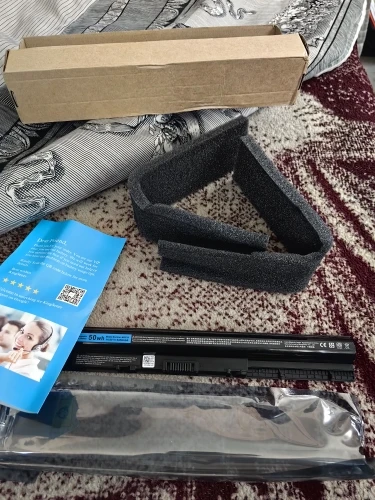
The M5Y1K (also GXVJ3, HD4J0, K185W, WKRJ2) is a 14.8V 47.66Wh Li-ion replacement battery for Dell Inspiron 14 3000/5000, Inspiron 15 3000/5000, Inspiron 17 5000, Vostro 3458/3558/3568/3578, and Latitude 3460/3560 series laptops. Ships 100% brand new. Backed by a 1-year warranty.
Product Specifications
| Attribute | Details |
|---|---|
| Battery Model | M5Y1K / GXVJ3 / HD4J0 / K185W / WKRJ2 |
| Capacity | 47.66Wh |
| Voltage | 14.8V |
| Battery Type | Li-ion |
| Cell Grade | Grade-A, high quality |
| Color | Black |
| Certification | CE, FCC, RoHS compliant |
| Warranty | 1-Year Warranty |
| Condition | 100% Brand New Replacement |
Replace Part Numbers
- M5Y1K
- GXVJ3
- HD4J0
- K185W
- WKRJ2
Compatible Laptop Models
- For Dell Inspiron 14 3451
- For Dell Inspiron 14 3458
- For Dell Inspiron 14 5459
- For Dell Inspiron 15 3552
- For Dell Inspiron 15 3558
- For Dell Inspiron 15 5559
- For Dell Inspiron 17 5759
- For Dell Vostro 3458
- For Dell Vostro 3558
- For Dell Vostro 3568
- For Dell Vostro 3578
- For Dell Latitude 3460
- For Dell Latitude 3560
Flex-3 Compatibility Note
Q: Is M5Y1K compatible with all Dell Inspiron 15 3000 / 5000 models?
The M5Y1K (14.8V, 47.66Wh, 4-cell) fits specific Inspiron 14/15/17 3000 and 5000-series configurations from 2015–2016. It is not compatible with newer Inspiron 3000/5000 models that use the YRDD6 (11.4V, 42Wh) or VVXTW (15.2V, 68Wh). Always check the battery label inside the bottom cover — do not order by laptop series name alone.
Why Choose This Battery
This M5Y1K replacement battery delivers reliable 47.66Wh power for Dell Inspiron 14/15/17 3000/5000-series laptops. Grade-A Li-ion cells, built-in BMS overcharge and short-circuit protection, CE, FCC, RoHS certified, and plug-and-play installation. Backed by a 1-year warranty with dedicated after-sales support.
注意:
这不是所有兼容笔记本电脑机型的完整列表。您可以打开笔记本电脑的底部来检查原装电池型号。如有任何兼容性问题,请在线咨询我们。外壳采用耐用材料制成,主板采用先进技术,电池芯采用优质原材料生产,确保长期使用后不会损坏。
我们的产品配备过压、过流、过充等多重保护技术,有效保护电池和设备的安全。
配送方式
| 运输方式 | 配送至 | 预计送达时间 | 运费 | 税费 |
|---|---|---|---|---|
| USPS / DHL | 美国 | 10-15 个工作日 | 免费 | 免费 |
| Canada Post | 加拿大 | 10-15 个工作日 | 免费 | 免费 |
| Royal Mail / Yodel | 英国 | 15-20 个工作日 | 免费 | 免费 |
| DHL | 德国 | 15-20 个工作日 | 免费 | 免费 |
| La Poste | 法国 | 15-20 个工作日 | 免费 | 免费 |
| Correios | 巴西 | 15-25 个工作日 | 起 $6.99 | 免费 |
| 本地快递 | 东南亚 / 东亚 | 5-10 个工作日 | 免费 | 免费 |
| 本地快递 | 欧洲其他地区 | 20-25 个工作日 | 起 $5.99 | 免费 |
| 本地快递 | 阿联酋 / 沙特阿拉伯 / 以色列 | 16-20 个工作日 | 起 $7.99 | 免费 |
📦 运输及物流信息
需要更快的运输? 我们提供本地仓储服务。
请访问我们的 “本地配送” 页面查看可立即发货的商品。
1. 如何追踪包裹:
请根据您的目的地选择对应的追踪链接:
- 欧洲及美洲: 17track.net/en
- 中东地区: mena56.com
- 亚洲: 17exp.kingtrans.cn
需要帮助?
如果在上述网站上无法找到您的包裹,请立即联系我们。
📧 邮箱: sales@batterymall.com / info@batterymall.com
📱 WeChat/WhatsApp: (+86) 198 6775 1872 / (+86) 191 2767 3310
🚚 预计送达时间
(1) 从中国发货:
- 亚洲:5-20 个工作日
- 北美:10-15 个工作日
- 欧洲/南美:15-20 个工作日
(2) 从本地仓库发货:
- 美国仓库:3-5 个工作日
- 欧洲仓库:2-10 个工作日
- 俄罗斯仓库:3-5 个工作日
注意:具体到达时间取决于不同国家及海关处理速度。
⚠️ 税费及海关信息:
全球产品价格已包含关税(部分国家可能需要提供税号)。具体运费请参考结算发票。如包裹被海关查验,将进行特殊处理。
支付方式
PayPal

支付方式:PayPal,无需 PayPal 账户即可支付。PayPal 对买家安全且免费。
PayPal 账户:Payment@batterymall.com
账户名称:深圳金森科技有限公司
Credit or debit card

支持 VISA、MasterCard、美国运通、Maestro、Laser 卡、Apple Pay 等。
PayPal 永远不会与我们共享您的财务信息。
微信支付

当前仅支持二维码支付。请联系微信客服,并在微信 App 中扫描二维码完成支付。
Google Pay
使用 Google Pay 支付,更方便快捷。
Apple Pay
如果您使用 Apple 设备,可使用 Apple Pay 支付,更方便快捷。
银行转账
Q&A
Quick FAQ:Laptop Battery Care & Troubleshooting
- How long does a KingSener battery last?2 to 3 years (approx. 500-800 charge cycles) under normal temperatures.
- Laptop says "Battery Not Detected". How to fix?1. Hard Reset: Unplug AC, remove battery, hold power button for 30 seconds.
2. Clean Contacts: Wipe metal connection pins.
3. Reset Drivers: Uninstall battery drivers in Device Manager, then restart.
4. Update BIOS: Ensure motherboard firmware is up to date. - Can I leave my laptop plugged in 24/7?Yes, the built-in TI chip prevents overcharging. Tip: To prevent long-term cell swelling, unplug and drain the battery to 40% twice a month.
- How do I store a laptop battery long-term?Store it at 50% charge in a cool, dry place. Never store at 0% or 100%. Cycle the battery every 3 months to maintain chemical activity.
-
Are KingSener batteries safe?Yes. All batteries feature built-in IC protection against short-circuits, over-voltage, and overheating. Fully CE, FCC, and RoHS certified.